Download. Organize. Share.
Sidecamp is the desktop companion app for TuneCamp. Search and download music across 7 sources (Soulseek, torrents, YouTube, Bandcamp, and more) — then organize folders, build CDJ-ready playlists, play tracks with a scrolling waveform, and share your collection back to the network as a peer node.
Modern Desktop GUI Dashboard
A sleek, low-overhead graphical client for easy library management and P2P downloading.
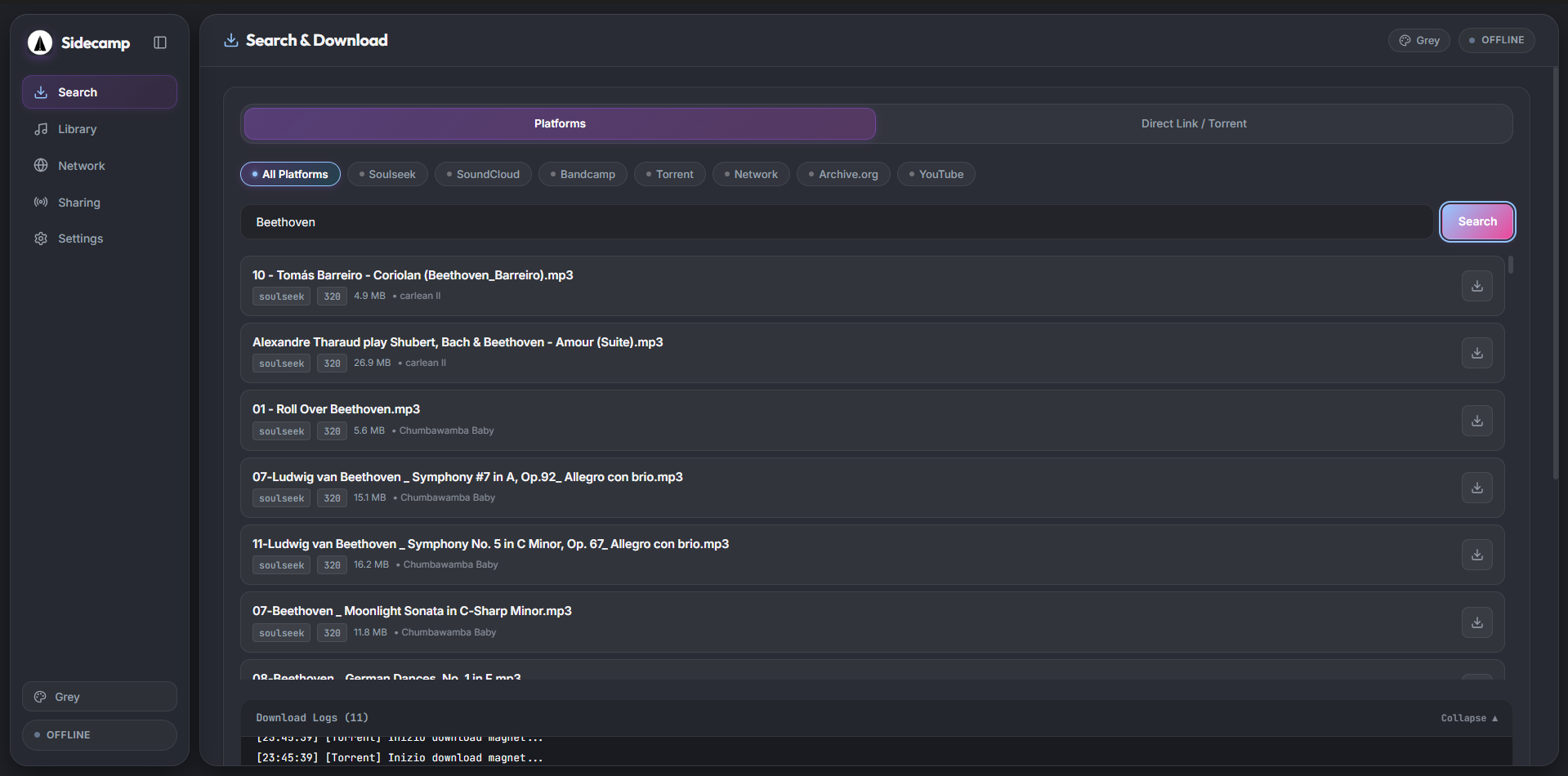
Search & Download: Unified multi-source search across Soulseek, SoundCloud, Bandcamp, Torrent, P2P Network, Archive.org, and YouTube — all from one interface with real-time download logs.
Key Features
Built for speed, convenience, and absolute user control.
Multi-Source Search & Download
Unified search across Soulseek, SoundCloud, Bandcamp, torrents, the Internet Archive (archive.org), and the TuneCamp peer network — all simultaneously or filtered by platform with real-time download logs.
Audio Library & Waveform Player
Browse your downloaded music library with an in-app player and a 60fps Rekordbox-style scrolling waveform canvas. Edit ID3 tags (title, artist, album) and rename files in place.
DJ Playlists & CDJ Export
Build and curate DJ sets directly from your library, reorder tracks, import/export playlist JSONs, and export flat CDJ-ready USB folders with UTF-8 M3U8 playlists for Pioneer CDJs.
Folder Organizer & Deduplication
Automatically scan, rename, and sort any local music folder by Artist, Album, or Genre. Detect duplicate tracks and auto-fill missing genre metadata using Beatport and MusicBrainz APIs.
P2P Network Explorer
Browse tracks shared by connected TuneCamp nodes and the central catalog. Live licensing awareness respects release terms: tracks marked For sale, Stream only, or External stream safely with protected downloads.
Peer Node & Zero-Config Tunnel
Share local music folders with any TuneCamp instance via a secure reverse WebSocket tunnel. No port forwarding or firewall configuration required — listeners stream or download via server relay.
Granular Sharing Permissions
Control access folder-by-folder in real time. Choose exactly which folders allow peer downloads and which remain streaming-only with the toggle of a switch.
Direct Upload to TuneCamp
Push tracks from your local library directly to your TuneCamp account. Metadata (title, artist, album) is pre-filled from saved ID3 tags — edit before upload in one click.
BitTorrent / WebTorrent Engine
Add magnet links or torrent files directly; download and seed from your desktop with live peer counts, speed metrics, and progress tracking.
yt-dlp Audio Extraction
Rip high-quality audio streams from YouTube, SoundCloud, Bandcamp, and hundreds of supported platforms. Binaries are automatically acquired and kept up to date.
Internet Archive Integration
Search and download free, public-domain audio directly from archive.org into your local collection — no manual browser downloads required.
Server Stays Clean & Compliant
Heavy P2P downloads and yt-dlp run exclusively on your desktop client. The TuneCamp server hosts only legitimate catalog and streaming data — 100% compliant.
Quick Start Guide
Install
Download for your platform:
All releases: GitHub Releases
Headless CLI Client:
# Run headless client / daemon (no Electron)
npm run build --workspace apps/sidecamp-cli
node apps/sidecamp-cli/dist/index.js --help
Or build from source:
git clone https://github.com/scobru/sidecamp.git
cd sidecamp
npm install
npm run dev --workspace apps/sidecamp      # development mode
npm run build --workspace apps/sidecamp    # build installer
Requires Node.js 18+. yt-dlp is downloaded automatically on first use — no manual install needed.
Configure in Settings
No config files needed. Open Sidecamp and go to Settings:
- → Enter your TuneCamp Server URL and paste your JWT Token to enable uploads and Network Explorer.
- → Add optional Soulseek credentials to search peer-to-peer audio networks.
- → Select local directories under Sharing to share music folders with your instance.
Start Using
Use Search & Download to find and fetch music across 7 platforms, organize folders and build CDJ playlists in Library, browse peers in Network, and manage folders and permissions in Sharing.